 Koala UI
Generation
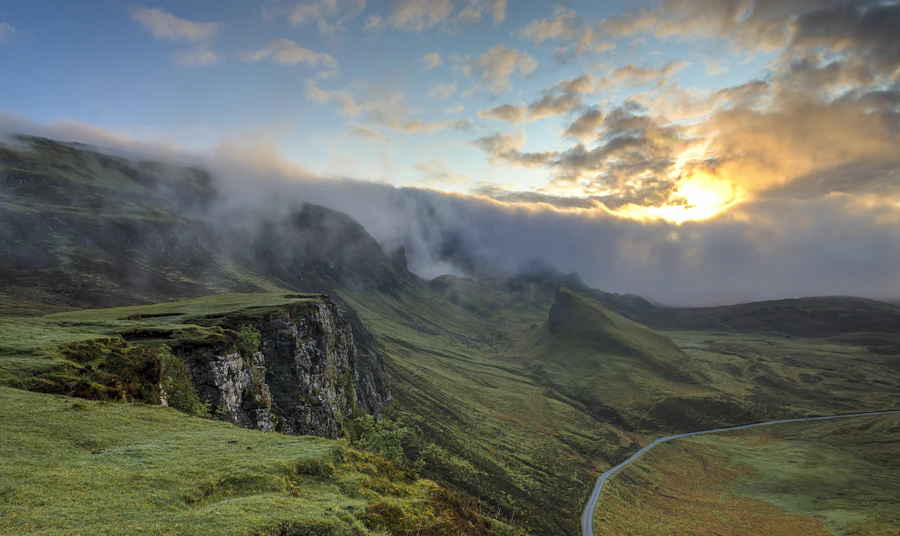
ProThe card a model fills while it paints a picture. The frame is sized by its ratio before there is anything to put in it, so nothing jumps, and the picture comes in from the top out of a halftone field of dots.
A valley at first light, low cloud caught in the pines, long shadows, shot on medium format film
Installation#
Usage#
The preview is yours to explore. Its code comes with a Pro license, paid once and used in every project.
Have a license? Unlock it here
Anatomy#
import {
  Generation,
  GenerationHeader,
  GenerationIcon,
  GenerationLabel,
  GenerationStatus,
  GenerationActions,
  GenerationAction,
  GenerationPrompt,
  GenerationCanvas,
  GenerationImage,
  GenerationCaption,
  GenerationProgress,
  GenerationPercent,
  GenerationOverlay,
  GenerationGrid,
  GenerationFooter,
  GenerationMeta,
} from "@/components/ui/generation"

<Generation>
  <GenerationHeader>
    <GenerationIcon />
    <GenerationLabel />
    <GenerationStatus />
    <GenerationActions>
      <GenerationAction />
    </GenerationActions>
  </GenerationHeader>
  <GenerationPrompt />
  <GenerationCanvas>
    <GenerationImage />
    <GenerationCaption />
    <GenerationProgress />
    <GenerationPercent />
    <GenerationOverlay />
  </GenerationCanvas>
  <GenerationGrid>
    <GenerationCanvas />
  </GenerationGrid>
  <GenerationFooter>
    <GenerationMeta />
  </GenerationFooter>
</Generation>
Four blocks, in reading order. An eyebrow says what kind of card this is (GenerationIcon + GenerationLabel, with a GenerationStatus chip or GenerationActions trailing). A GenerationPrompt quotes back what you asked for. The GenerationCanvas is the frame everything happens inside. A footer carries the meta and whatever you do next.
The frame never resizes. You know how big a picture will be long before you know what is in it, so the canvas takes its ratio up front: the card stands at its final height from the first frame, and nothing below it jumps when the bytes land. The picture is inset 8px from the card's edge with the radius that follows from it (24 − 8 = 16), the same geometry CardMedia uses, so the copy keeps its own, wider measure and the photograph reads as framed rather than as a header band.
A valley at first light, low cloud caught in the pines, long shadows, shot on medium format film
The reveal#
Mount the GenerationImage as soon as you have a URL, not when you are finished. Everything below it sits under a halftone screen whose holes open as progress climbs. At 62% you are looking at the picture through a plate that is 62% open, everywhere at once, the way a halftone resolves when you step back from it. The percentage stops being a number beside the picture and becomes the picture.
It glides rather than marches. The reveal is a registered custom property (--generation-reveal), which means a percentage that CSS can interpolate: a model reporting 40 → 62 → 100 reads as one continuous movement, and finishing just carries the number to 100, so the last stretch wipes in instead of cutting. Report no percentage at all and there is nothing to wipe to: the frame simply works at full size and a bar goes indeterminate, which is the honest reading.
The screen is the frame's own ground with two layers of one 12px dot grid drawn on it (small dots everywhere, large ones in the middle), breathing on a registered --generation-dot radius, so the plate swells and settles like something being worked on. The holes are punched half a cell off the dots, so they open between them and the dots are the last thing left standing. It is the part the frame keeps for itself: nothing to compose, nothing to remember to remove.
Nothing sweeps, nothing is tinted, and nothing travels in a direction. A shimmer passing over the frame, a blurred veil, a brand-coloured field, a lit hairline and a top-to-bottom wipe were each built and each thrown out: every one read as an effect laid over the work rather than as the work. A line crossing a picture reads as a scanner passing over it. The dots are plain ink at 30%, so they re-theme by themselves and leave the picture as the only coloured thing in the card.
Drag the percentage below to take the reveal at your own pace. Note the demo sets transition="none": a frame driven continuously (a slider under your finger, a stream reporting every frame) shouldn't ease, or it trails a third of a second behind you and reads as lag. It is the same axis, for the same reason, that Progress carries.
States#
One status on the root moves the whole card: idle → generating → complete, or failed. Only the frame changes. While it works, the halftone screen sits over the picture and breathes; as the percentage climbs its holes open, and at 100% there is no plate left: the frame simply holds a photograph.
The state parts know when they aren't wanted. GenerationCaption and GenerationProgress render nothing once the picture is there; GenerationOverlay renders nothing until it is. Not hidden, not transparent: not in the DOM. So you leave all three in your markup unconditionally and never write a ternary around them.
Variations#
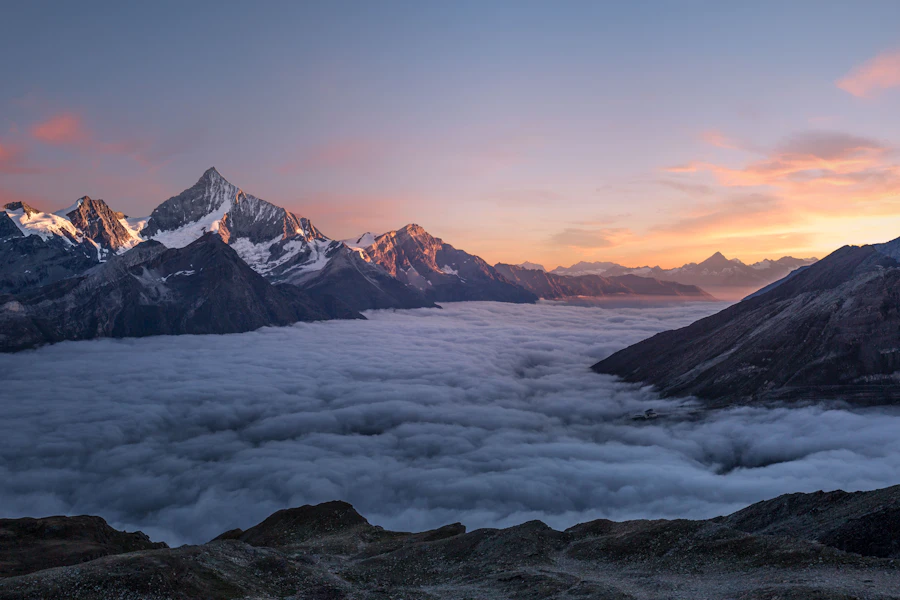
GenerationGrid lays a batch out as a contact sheet, two to four across. Each GenerationCanvas takes its own status, because a real batch comes back one tile at a time, so each frame keeps its own shimmer and settles when it is ready. Tiles land a beat apart rather than all at once, which is the difference between a sheet developing and four boxes appearing.
A valley at first light, low cloud caught in the pines, long shadows, shot on medium format film


Ratios#
ratio on the root sizes the hero frame and every tile of a sheet at once: square, portrait (3:4), landscape (4:3), wide (16:9), tall (9:16), or auto when the height comes from the layout around it. A single GenerationCanvas can overrule it: a landscape hero over a square sheet is the common pair.
In a chat turn#
variant="plain" drops the ring, the shadow and the gutter so a generation sits inside a Chat turn or an AIPanel body as part of the answer rather than as a card inside a card. The picture then takes the full measure of the turn: there is nothing left for it to be inset from, so the inset lets go too.
API reference#
Generation
The root and the provider; sets aria-busy while generating. Forwards all native <div> props; every part accepts className, merged last.
| Prop | Type | Default | Description |
|---|---|---|---|
| status | "idle" | "generating" | "complete" | "failed" | "complete" | Drives the halftone screen, the GenerationStatus chip, aria-busy and which state parts render at all. |
| progress | number | null | null | Percent, 0 to 100, read by every readout in the card. null means the model reports none: bars sweep and the screen stays shut. |
| ratio | "square" | "portrait" | "landscape" | "wide" | "tall" | "auto" | "square" | The frame's shape, taken before there is a picture; sizes every canvas in the card. |
| variant | "card" | "plain" | "card" | card is the ringed standalone artifact; plain drops the chrome and gutter for a Chat turn or an AIPanel body. |
| transition | "smooth" | "none" | "smooth" | How the reveal reacts to a new percentage: eased, or welded to the number for a continuously driven frame. |
| density | "comfortable" | "compact" | "compact" | Padding, gaps and the grid gutter; the 8px media inset never moves. Falls back to the nearest DensityProvider. |
| asChild | boolean | false | Merge onto your own element via Radix Slot instead of rendering a <div>. |
| Data attribute | Description |
|---|---|
| data-status | The resolved state: idle, generating, complete or failed. |
| CSS variable | Description |
|---|---|
| --generation-reveal | How far open the halftone screen is, as a percentage; a registered property, so it interpolates. |
| --generation-stagger | The beat between tiles of a GenerationGrid entering. |
GenerationHeader
The eyebrow row: an icon, a label, then a status chip and/or actions. Forwards all native <div> props.
GenerationIcon
The eyebrow's glyph, aria-hidden. Forwards all native <span> props.
GenerationLabel
The eyebrow's word ("Image", the model's name), truncated. Forwards all native <span> props.
GenerationStatus
An optional Badge derived from the root's status (Ready, Generating with a spinner, Done, Failed with a warning glyph). Forwards all Badge props.
| Prop | Type | Default | Description |
|---|---|---|---|
| variant | BadgeProps["variant"] | - | Overrides the per-state tone. |
| children | React.ReactNode | - | Overrides the per-state wording. |
GenerationActions
Trailing slot for icon buttons, in the header, the footer or the overlay. Forwards all native <div> props.
GenerationAction
One tool, a thin Button wrapper; forwards all Button props. Over a picture, pass tone="onMedia".
| Prop | Type | Default | Description |
|---|---|---|---|
| variant | ButtonProps["variant"] | "ghost" | The Button variant. |
| size | ButtonProps["size"] | "sm" | The Button size. |
| iconOnly | boolean | true | Square icon button; give it an aria-label. |
GenerationPrompt
The prompt, quoted back in muted ink. Forwards all native <p> props.
| Prop | Type | Default | Description |
|---|---|---|---|
| lines | 1 | 2 | 3 | - | Clamp to this many lines; the full text stays in the DOM. No clamp when omitted. |
GenerationCanvas
The frame, sized by its ratio from the first render; owns the halftone screen and the edge ring, and pins a GenerationProgress dropped inside to its bottom edge. Forwards all native <div> props.
| Prop | Type | Default | Description |
|---|---|---|---|
| ratio | "square" | "portrait" | "landscape" | "wide" | "tall" | "auto" | - | Overrules the root's ratio for this frame. |
| status | "idle" | "generating" | "complete" | "failed" | - | Overrules the root's status for this frame, so a sheet finishes tile by tile. |
| progress | number | null | - | Overrules the root's progress for this frame, so each tile opens at its own pace. |
| Data attribute | Description |
|---|---|
| data-status | The resolved state: idle, generating, complete or failed. |
| CSS variable | Description |
|---|---|
| --generation-reveal | Set on the frame when it has its own progress or has finished ahead of the card. |
| --surface | Set to var(--muted), read by nested controls. |
GenerationImage
The picture under the screen: a raw <img> that fades up as it decodes, and again when src changes. Mount it as soon as you have a URL; forwards all native <img> props.
| Prop | Type | Default | Description |
|---|---|---|---|
| alt | string | "" | Decorative by default; pass a real alt when the image carries meaning. |
| Data attribute | Description |
|---|---|
| data-loaded | Present once the image has decoded. |
GenerationCaption
The line inside an empty frame with the glyph its state implies; reads the root's status and renders nothing once it is complete. Forwards all native <div> props.
| Prop | Type | Default | Description |
|---|---|---|---|
| children | React.ReactNode | - | The words. Omitted, it says what the state says; null shows only the glyph, for a small tile. |
GenerationProgress
How far along as a hairline, composing Progress; renders only while the root is generating. Forwards all Progress props.
| Prop | Type | Default | Description |
|---|---|---|---|
| value | number | null | - | Overrules the root's progress; null sweeps indeterminately. |
| variant | ProgressProps["variant"] | "chrome" | The Progress variant. |
| size | ProgressProps["size"] | "xs" | The Progress size. |
| tone | ProgressProps["tone"] | "foreground" | The Progress tone. |
| aria-label | string | "Generating" | The progressbar's accessible name. |
GenerationPercent
How far along as a pill Badge in the frame's bottom-right corner; renders only while generating with a number to show. Use it or GenerationProgress, not both.
| Prop | Type | Default | Description |
|---|---|---|---|
| value | number | null | - | Overrules the root's progress. |
| children | (percent: number) => React.ReactNode | - | Formats the rounded percentage. Defaults to 62%. |
| variant | BadgeProps["variant"] | "overlay" | The Badge variant, legible on a photograph. |
| size | BadgeProps["size"] | "sm" | The Badge size. |
GenerationOverlay
The tools over a finished picture: a scrim that fades up on hover, focus or a coarse pointer. Renders only when the root is complete; forwards all native <div> props.
GenerationGrid
A sheet of variations whose tiles enter one beat apart, in CSS. Forwards all native <div> props.
| Prop | Type | Default | Description |
|---|---|---|---|
| columns | 2 | 3 | 4 | 2 | Frames per row; two hold on a phone, three and four fan out from sm. |
GenerationFooter
The closing row: meta on the left, actions kept to the right edge when it wraps. Forwards all native <div> props.
GenerationMeta
Model, size and time in small tabular type, truncated. Forwards all native <span> props.